Status Flasher
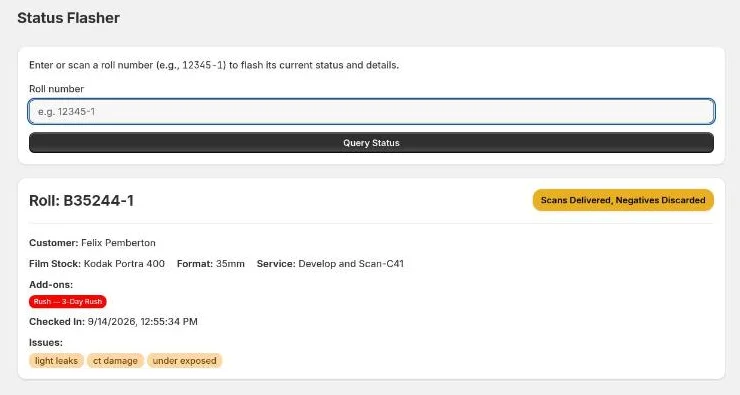
Status Flasher answers "what's happening with this roll?" or "where's this order?" without changing anything. Scan a roll, or look up an order or a customer, and the details flash up in big type. It's ideal at the counter when a customer asks about their film, or for checking a roll you've found on a cart.
How to use it
- In Roll, label, order, or customer, scan a roll label or type one of:
- a roll number, e.g.
B12345-1 - a pre-printed label
- an order number, e.g.
B12345 - part of a customer's name or email
- a roll number, e.g.
- Press Enter or select Query Status.
The box clears straight away, ready for the next scan.
Start with # (e.g. #4521) to search orders only. Use it when an order
number could also be read as a pre-printed label number.
Looking up a roll
The roll stays on screen for 20 seconds. It shows:
- The roll number, its status (in the status colour) and its Bin, if it has one.
- This order requires shipping, if it does.
- Customer, Film Stock, Format, Service and Add-ons.
- When it was Checked In.
- Any Issues, and the Public and Private Notes.
- Other rolls in this order, with their statuses.
Looking up an order or customer
An exact order number opens that order. A name, an email or part of a number lists the matching orders, newest first, with each one's customer, roll count, bin and status. Select an order number to open it. If there are more than 10 matches, only the 10 most recent are listed. Type more to narrow it down.
An order stays on screen for 60 seconds, since there's more to read. It shows the order's status, bin, customer, number of rolls, check-in time and notes, then a card for every roll with its film stock, format, service, add-ons, issues and status.
Things to know
- Nothing is changed. To move a roll forward, use Order Updates or Scanning.
- If the order has Changed in Shopify, you're asked to sync it first so you aren't shown a roll list that's out of date. After syncing, the lookup runs again by itself.
| Message | Meaning |
|---|---|
| No roll or order matches "…" | Nothing matched. Check the spelling or number. |
| Enter an order number after the # | You typed # with nothing after it. |