Inbound Labels
Inbound Labels tracks the prepaid shipping labels sent to customers who mail their film in. When someone buys a mail-in box on the store, Twin Check'n emails them a form for their return address. Once they fill it in, it buys the label through Redo and emails it to them. This page shows where every request is and lets you fix the ones that get stuck.
How a request flows
- A customer places an order that includes a mail-in box product.
- Twin Check'n creates a request and emails them a form link. The request shows Awaiting address.
- The customer enters their address and picks a carrier from live rates.
- The label is bought and emailed to them as a PDF, in letter size, 4×6 or both. The request shows Label bought.
One label is bought per box, so an order for two boxes gets two labels.
Finding a request
Use the tabs (Awaiting address, Labels bought, Failed) or Search by order number. Each request card shows the order number, its state, the carrier, the number of boxes and when it was created. Select Show shipping address to see where it's coming from.
For each box you'll see the box size, what the label cost against what the customer paid, and the tracking number.
Fixing a request
| Situation | What to do |
|---|---|
| Not emailed badge | The form email didn't send. Select Re-send form link. Each resend creates a fresh link. |
| Customer lost their label | Select Re-send labels. |
| The link expired | Select Re-send form link. Links last as long as set in Settings (14 days by default). |
| Failed: the carrier refused the address | Select Ask for the address again, or (admins) pick a different Carrier and select Buy and email. |
| Wrong address on file (admins) | Select Edit address, correct it and Save address, then retry. |
| Label bought by mistake (admins) | Select Void on that box. It's refunded if the carrier hasn't scanned it. The box then shows Refund pending, Refunded or Refund rejected — retry. |
| Every label voided and a new one is needed (admins) | Select Reissue. |
Warnings at the top of the page
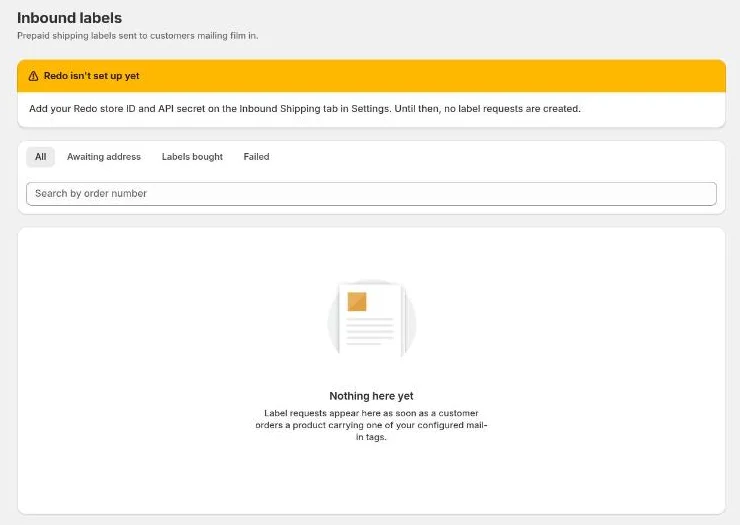
- Redo isn't set up yet: no requests are being created. An admin needs to add the Redo details in Settings → Inbound Shipping.
- Customers aren't being emailed their form link: requests are being created, but SendGrid isn't set up in Settings → Notifications. Once it is, re-send the links.
- … customers have not been emailed a form link: re-send those links.
- … labels cost more than the customer paid: those boxes are flagged Over what they paid. Consider adjusting the box sizes or the product price.
Setup is covered in Settings → Inbound Shipping.