Productivity
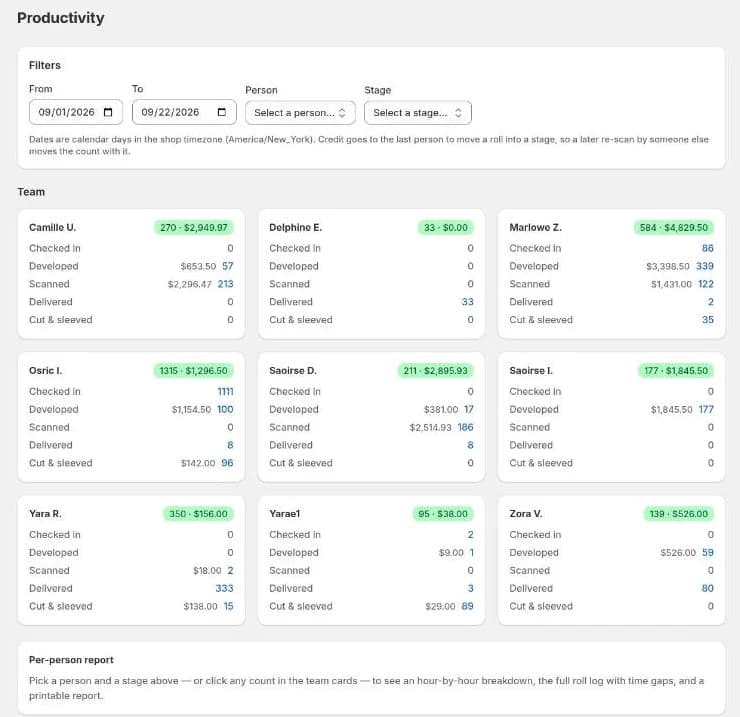
Productivity shows who did what, and how much it was worth. It counts each staff member's work at every stage of the lab and breaks one stage down in detail for one person, with pace, peak hours and value.
How work is counted
Work is credited when someone moves a roll into a status that's mapped to one of five actions: Checked in, Developed, Scanned, Delivered and Cut & sleeved. The mapping is set in Settings → Metrics → Team Productivity.
- Credit goes to the last person to move a roll into that stage. If someone else re-scans it later, the credit moves to them.
- Each roll counts once per action.
- Dates are calendar days in the shop's time zone.
That's why it matters that everyone signs in with their own account. See Logging in.
Filters
- From and To: the date range.
- Person: whose detail report to show.
- Stage: which action to report on.
Team
One card per person showing their count for each action in the range.
The per-person report
Choose a Person and a Stage, or select any count on a team card, to see:
| Figure | Meaning |
|---|---|
| Total rolls | Rolls they moved into that stage. |
| Avg velocity | Rolls per hour across their active span. |
| Peak hour | Their busiest hour, and when it was. |
| Active span | How long they were working in that stage. |
| Value created | The revenue credited to that stage (see below). |
| Days active / Avg per active day / Best day | Consistency over the range. |
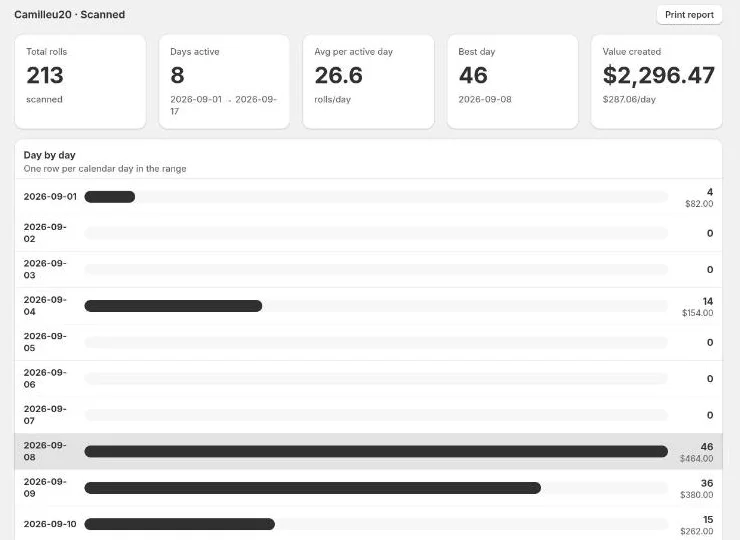
Below that is a table of every roll with its order, value and add-ons.
Select Print report for a printable copy.
Value created
Each service's price is split across the stages that earn it. For example, a "Develop and Scan" roll is split 50/50 between developing and scanning by default. Add-on revenue goes entirely to its own stage. Admins set the splits in Settings → Metrics → Value Split.
Messages
- No statuses are mapped to productivity actions: set the mapping in Settings → Metrics → Team Productivity.
- Some rolls have no captured pricing: those orders were checked in before value tracking existed. An admin can run Backfill pricing under Settings → Metrics → Value Split.
- Report truncated: over 2,000 rolls matched. Narrow the date range.