Staff
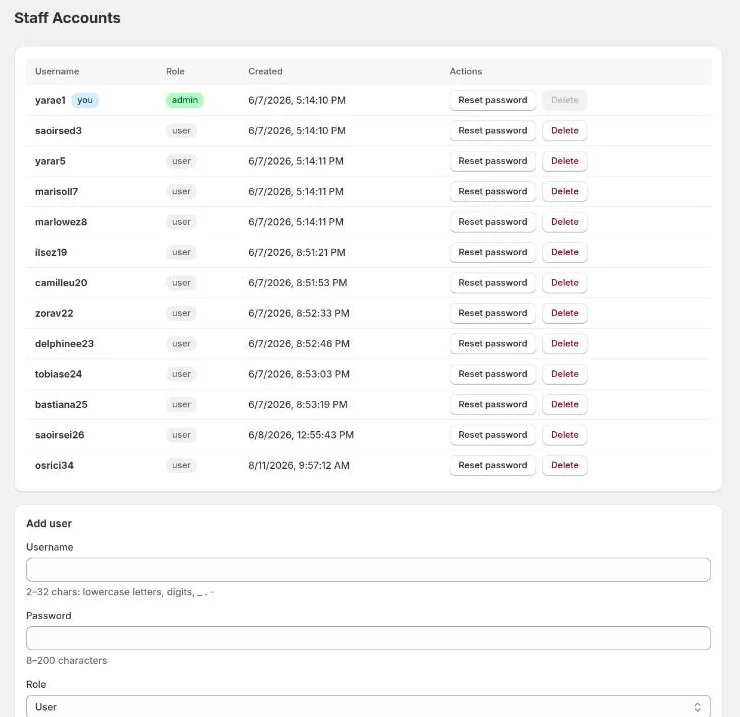
Admins only. The Staff page is where you manage the personal accounts people use to sign in to Twin Check'n. Each account is what puts a name on check-ins, scans and status changes, so every person who works in the lab should have their own.
Adding someone
- Under Add user, enter a Username: 2–32 characters, using lowercase
letters, digits,
_,.or-. - Enter a Password of at least 8 characters.
- Choose a Role:
- User: all daily work.
- Admin: also manages staff, the Notifications and Inbound Shipping settings, secret keys, pricing backfill, sync bypasses and voiding labels.
- Select Create user, then give them their username and password.
Resetting a password
Select Reset password next to the person, enter a New password (at least 8 characters) and confirm.
Removing someone
Select Delete next to the person. Their name stays on the history they recorded. You can't delete yourself, and you can't delete the last admin. Make someone else an admin first.
Messages
| Message | Meaning |
|---|---|
| Username already taken | Pick another. |
| Cannot delete yourself | Ask another admin. |
| Cannot delete the last admin | Create another admin first. |